
by Professor Petabyte
Keypads are ubiquitous input devices used across electronics, computing, security, industrial systems, and embedded projects. At their core, a keypad is simply an array of push-buttons arranged in a convenient grid—typically 3x4 or 4x4 for numeric or alphanumeric entry—but the concept extends to any structured collection of momentary switches designed for human interaction. Their appeal lies in their simplicity, low cost, tactile reliability, and ease of integration with microcontrollers, including favourites like the Raspberry Pi Pico running MicroPython.
Most small keypads used in hobby and embedded applications are matrix keypads. Instead of dedicating one wire per button—which would be wasteful in both wiring and GPIO usage—the buttons are arranged at the intersections of rows and columns. A 4x4 keypad therefore uses only 8 I/O lines to read all 16 buttons. Internally, each key is just a switch that connects one row to one column. Reading the keypad generally involves setting one row line LOW at a time and reading the column lines; whichever column reads LOW indicates which key is pressed. Microcontrollers can scan the keypad rapidly, giving the illusion of instant recognition. This matrix arrangement not only saves pins but also reduces cable bulk and manufacturing complexity.
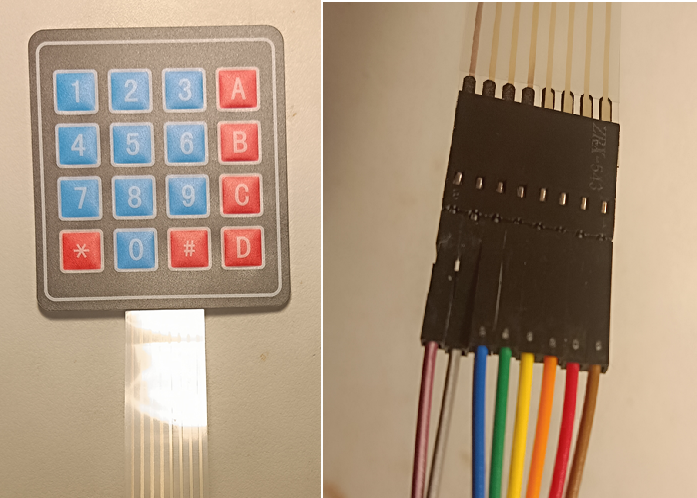
Keypads are essentially small numeric keyboards, which are mostly used as combination locks. The two common varieties are 12 and 16 key KeyPads.

For this demonstration GPIO pins 0 - 7 are used. Other GPIO pins can be used. Starting from the left of the, the connections on the ribbon cable are
Note that normal jumper wires can be plugged straight into the ribbon cable connector.
from machine import Pin
import time

# Define the key labels
keypad = [
    ['1', '2', '3', 'A'],
    ['4', '5', '6', 'B'],
    ['7', '8', '9', 'C'],
    ['*', '0', '#', 'D']
]

# Initialize GPIO pins for rows (outputs)
row_pins = [Pin(i, Pin.OUT) for i in range(4)]  # GPIO 0 to 3

# Initialize GPIO pins for columns (inputs with pull-down)
col_pins = [Pin(i + 4, Pin.IN, Pin.PULL_DOWN) for i in range(4)]  # GPIO 4 to 7

def scan_keypad():
    for row_index, row in enumerate(row_pins):
        # Set all rows low
        for r in row_pins:
            r.value(0)

        # Set current row high
        row.value(1)

        # Check each column
        for col_index, col in enumerate(col_pins):
            if col.value() == 1:
                return keypad[row_index][col_index]

    return None

# Main loop
print("Keypad ready. Press a key:")

while True:
    key = scan_keypad()
    if key:
        print("Key pressed:", key)
        # Wait for key release (debounce)
        while scan_keypad() == key:
            time.sleep(0.05)
    time.sleep(0.1)
One important issue with keypads is switch bounce. Mechanical contacts do not close cleanly; instead, they chatter for a few milliseconds. If unfiltered, this produces multiple rapid transitions and can cause the firmware to think several presses occurred. Debouncing can be handled either in hardware (using resistors and capacitors) or in software (timing-based filtering). Most modern designs, especially those using MicroPython, rely on software debouncing: once a key transition is detected, the firmware waits a short period—say 20-50 ms—before accepting the next transition.
Another challenge is ghosting. In a matrix keypad, if multiple keys are pressed simultaneously, it is possible for unintended row/column connections to cause phantom key readings. Basic keypads provide no internal diodes, so their circuits allow these ghost conditions. For applications where multi-key presses matter—such as musical instruments or complex control panels—diode-protected keypads or individually wired switches are preferred. For standard numeric entry, however, ghosting is rarely an issue because users typically press one key at a time.


Keypads also vary both size (number of keys) and in physical (qualitative)construction. Here you can see 4, 2, 16 and 20 key kepad tyeps,
Rigid PCB-backed units are durable and ideal for industrial panels. Membrane keypads are lightweight, sealed, and inexpensive; they consist of printed conductive traces separated by a flexible spacer layer. Silicone rubber keypads, common in remote controls, use conductive carbon “pills” that make contact with PCB pads when pressed, offering a soft, quiet action. Each construction type has trade-offs in tactile feel, longevity, moisture resistance, and cost.

Some keypads have customisations, such as the hotel room safe pictured here. Note that it has some LEDs added - "Ready", "Low Battery" and "Proceed".
In embedded projects, keypads are invaluable for menu navigation, PIN entry, configuration, and data input where a full keyboard would be impractical. Interfacing a keypad to a microcontroller is straightforward, often using standard libraries. On the Raspberry Pi Pico, MicroPython code can scan a keypad by driving row pins as outputs, reading column pins as inputs with pull-ups, and implementing a simple scanning loop. With debouncing and optional key-repeat behaviour, a small keypad becomes a powerful user interface element in any custom system.
Ultimately, the modest keypad remains an essential tool in human-machine interaction: tactile, reliable, simple, and perfectly suited for everything from door-entry panels to DIY electronics.